
 FWBen
FWBenWhat is GG Club?
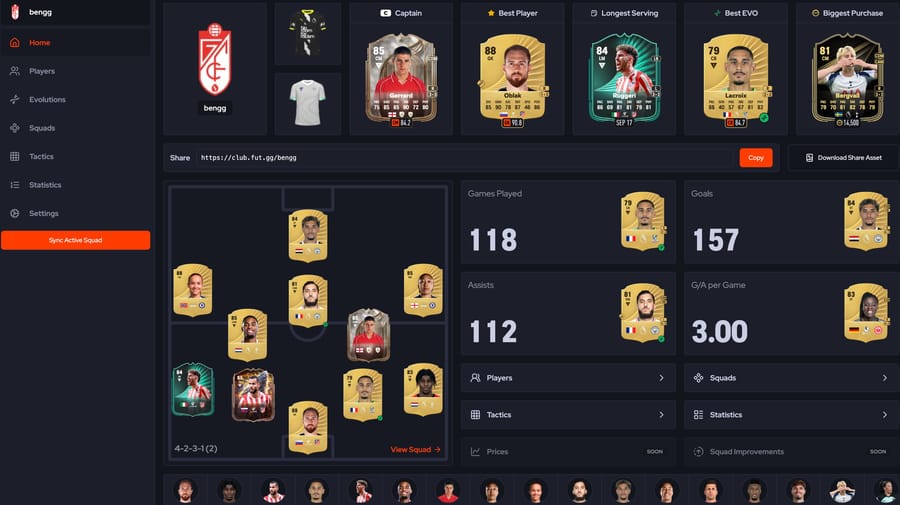
GG Club is a FUT.GG exclusive feature, and brand new for FC 26. GG Club allows you to sync your Ultimate Team Squads and view your Evolutions, Players, Tactics, and Player Stats on FUT.GG. This makes for a more seamless and integrated experience on the site, allowing you to more easily find upgrades to your squad, and easily share your club, tactics and players with your friends.
General FAQs
How do I verify my GG Club?
Verifying your GG Club is extremely quick and easy:
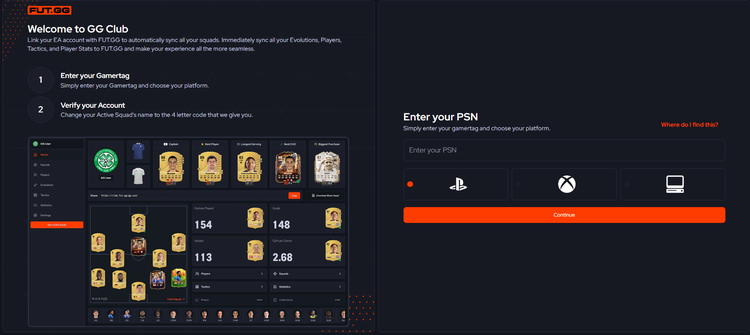
- Head over to fut.gg/gg-club
- Enter your Gamertag, PSN or EA ID (for PC)
- Verify your account by changing your active squad name to the 4 digit code we give you
- Press the big orange button to verify
- After a few seconds, enjoy GG Club!
Is GG Club safe?
Yes, GG Clubs squad syncing method is completely safe. No EA login information, EA authentication, or private data is required when we access your squad information. This means it is both safe and allowed within EA’s Terms of Service.
Is GG Club in the FUT.GG App?
We didn’t want to delay release of the GG Club feature to wait for it to be released on the app. Therefore it is only currently available on desktop and mobile web. The experience on mobile web is optimized though, so if you are using a mobile device there is no need to wait for GG Club to come to the app before getting started. We don’t have an ETA at this time, but rest assured we’re working on it!
Can I change my squad name after verifying my squad?
Yes, the 4 digit code is only required for initial verification, after this you can change your squad name to whatever you’d like.
What can I sync with GG Club?
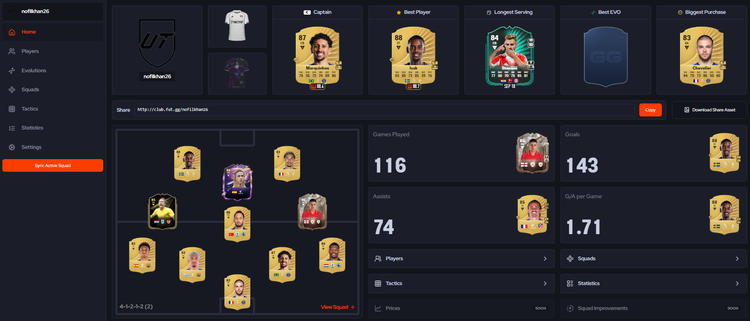
GG Club syncs a squad (or multiple squads with GG+ in the future), this means GG Club has access to your synced squad’s:
- Evo Players
- Your Kits & Badge
- Player Statistics (Goals, Assists, Games Played, Cards, Acquisition Date, Tradeability, Purchase Price and Kit Numbers)
- Tactics
- Multiple Squads (Coming soon with GG+)
How do I sync other squads?
At time of writing only your active squad can be synced. In the future multiple squad syncing will be possible with GG+. It’s worth noting you can change your active squad in-game to sync different squads using your daily sync.
How often can I sync?
As standard all users receive 1 manual sync every 24 hours. In the future there will be avenues to gain extra syncs.
A player is missing (or isn’t evolved) in GG Club?
The player could be missing, or isn’t accurately reflected in GG Club, for a number of reasons:
- You have not synced since adding, or evolving, the player
- The player is not in your active squad
How do I see my tactics in GG Club?
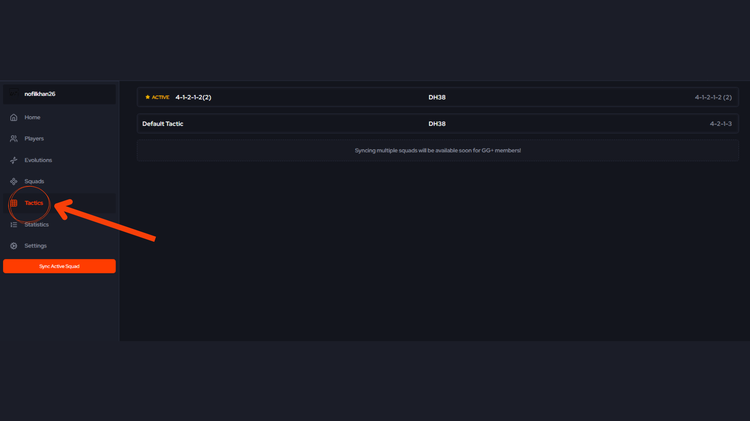
You can see every tactic you have set, and easily copy the tactics code, for any synced squad. Simply head over to the “Tactics” section in the main GG Club menu.
How can I make changes to my squad?
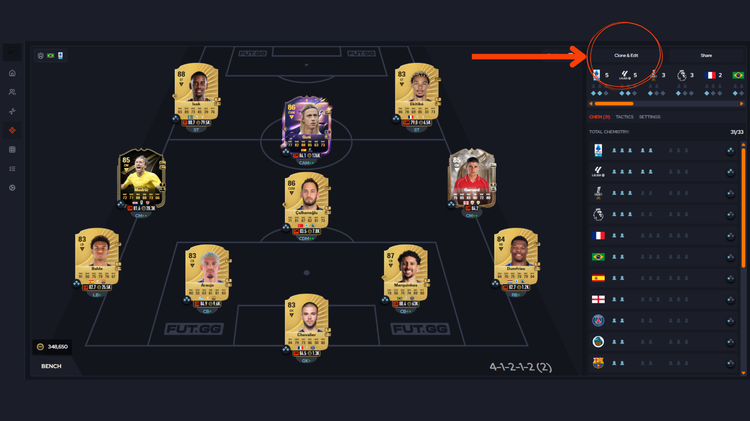
- Head over to the “Squads” section in the main GG Club menu
- Select the squad you’d like to adjust
- Tap the “Clone and Edit” button

This makes the squad editable in our Squad Builder, here you can see suggestions for improvements utilizing both GG Rating and Chemistry.
How do I see player stats in GG Club?
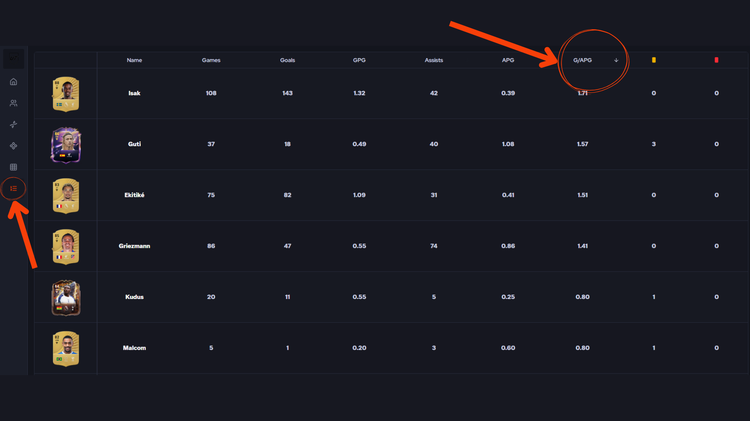
Simply head over to the “Statistics” section in the main GG Club menu. Here you can see player statistics and sort by the column headings, such as Goals & Assists Per Game (G/APG).
How do I share my GG Club?
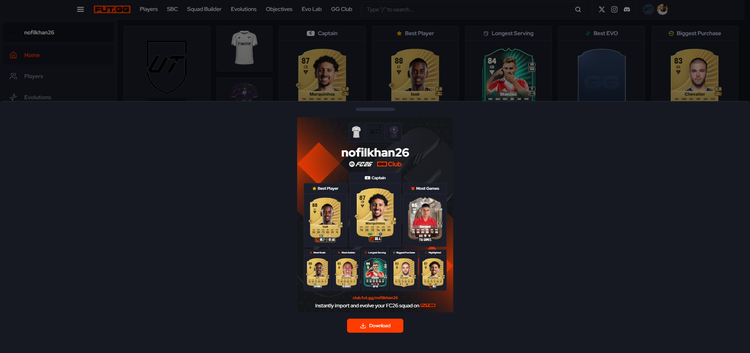
Navigate to your GG Club homepage by tapping “Home” or your Club Badge, here you’ll see a link you can share with friends and social media.

Next to that you can tap the “Download Social Asset” button and we’ll generate an image previewing you GG Club that you can download to share on social media.
How do I make my GG Club private?
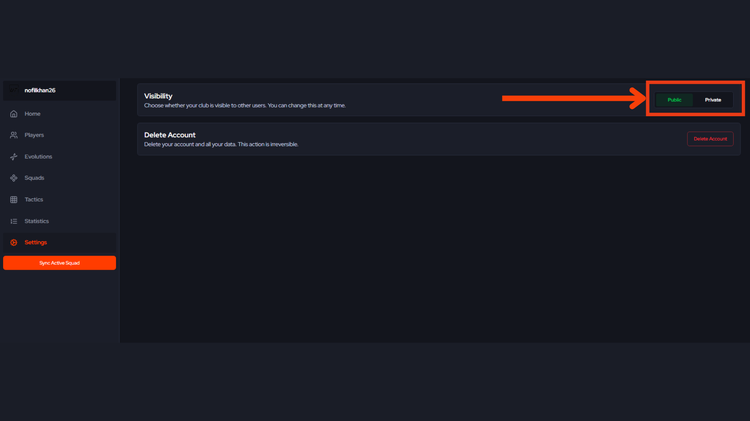
Head to the “Settings” menu option in the GG Club main menu, here you’ll see the setting to make your GG Club private. You can still share the Social Asset but the shareable link will not work.
How do I delete my GG Club?
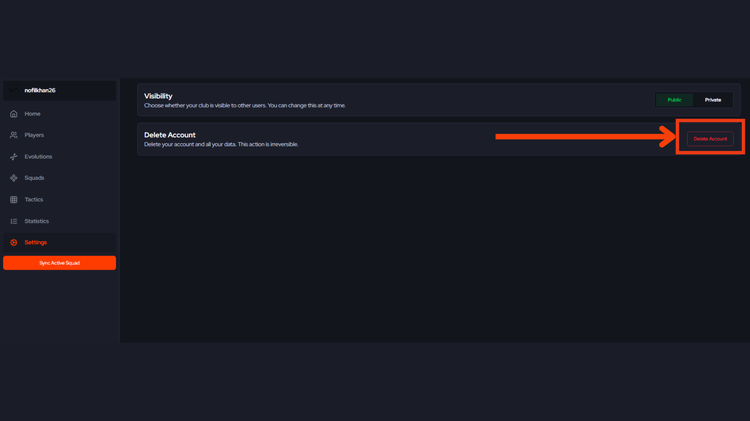
Head to the “Settings” menu option in the GG Club main menu, here you’ll see the “Delete GG Club” menu option. You can always come back, you’ll just need to verify again.
I’m having a technical issue with GG Club
If the above or below FAQs don’t help you with your technical issue, contact us on Discord for support.
Evolution FAQs
How do I see what Evolutions my Evo players have gone through?
Unfortunately the information for which Evolutions a player has gone through is not available to FUT.GG currently. However, you could track this by saving the data to a player via drafts.
A path includes an Evolution I’ve already done (or won’t unlock), how do I exclude the Evolution?
Evolutions can be manually excluded by navigating to “Evolutions” in the main GG Club menu, then “Evo Home” then “Excluded Evolutions” along the top of that page. They can also be excluded in various places using the “...” more menu on the specific Evolution you wish to exclude.
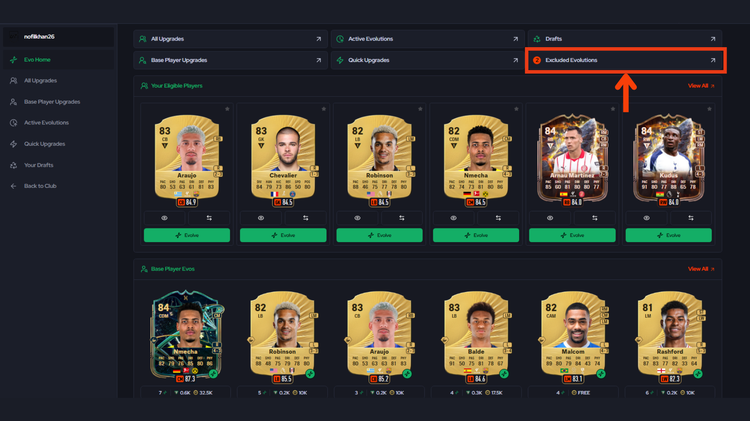
As per the previous FAQ, we do not have the data for which Evolutions have been “used”, or which Reward Evolutions have or haven’t been “unlocked”.
Does Evo Lab sync or link to GG Club?
Evo Lab does not sync or link with GG club. This is because we have made the decision to sync with the game, as that is a completely accurate “source of truth” for your evolutions. It’s worth noting that Evolutions applied to players in Evo Lab are not excluded automatically in GG Club.
What is the “All Upgrades” section?
All upgrades shows whether upgrades are available for synced players. You can then tap “Evolve” and use the generate tool to see the best possible evo path for a player, or use the build tap to apply individual Evolutions.
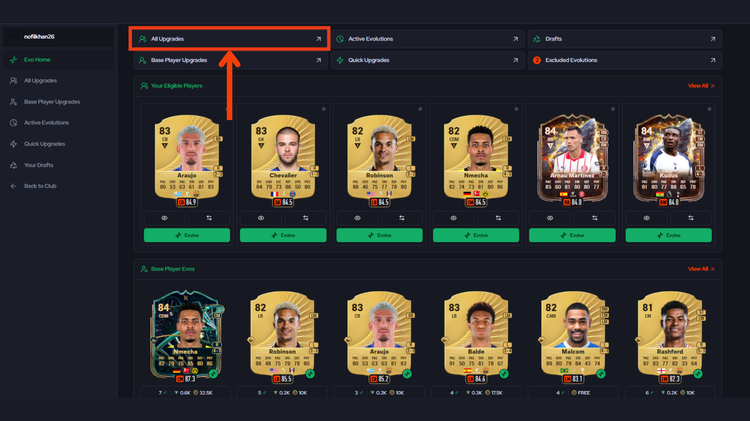
This section can be found in the Evolutions section of GG Club, then “All Upgrades”.
What is the “Base Player Upgrades” section?
In the “Base Player Upgrades” section you can see the evolution paths that are available for your Base Players (players that have not been evolved). This utilises the active evolution paths we generate for base players across FUT.GG. These exclude most Reward Evolutions, to add these use the Generate or Build tabs.
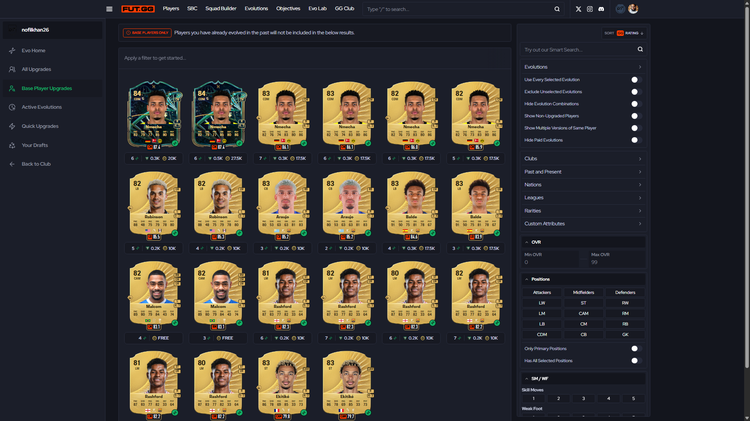
This section can be found in the Evolutions section of GG Club, then “Base Player Upgrades”.
What is the “Quick Upgrades” section?
The “Quick Upgrades” section shows single-evolution upgrades for you players, these can be sorted by Overall, Highest GG Rating and Biggest GG Rating improvement.

This section can be found in the Evolutions section of GG Club, then “Quick Upgrades”.
What is the “Active Evolutions” section?
The “Active Evolutions” section shows all the currently active Evolutions. You’ll find that your eligible players that fit those evolutions will show upgraded in the Evolution preview. You can then click through to see more players and more detail.
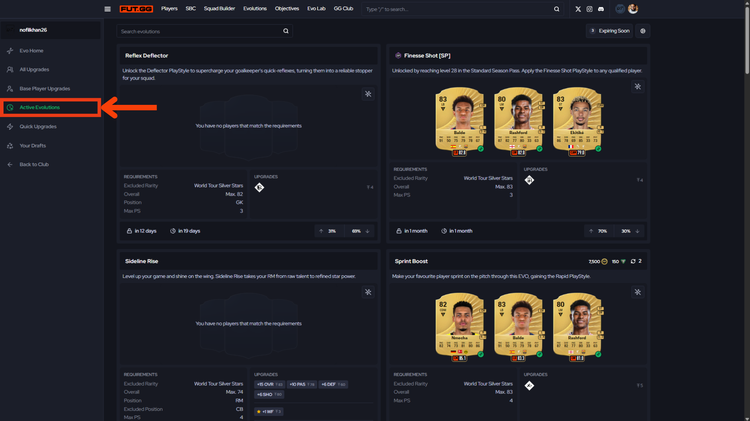
This section can be found in the Evolutions section of GG Club, then “Active Upgrades”.
What are “Your Drafts”?
Within “Your Drafts” you’ll find any Draft Evolutions you have saved. Drafts are evos you’ve built from synced players that you want to save for future reference, and/or for comparison. You can save paths to drafts throughout the GG Club evolution section. We’re planning to add the ability to opt-in to excluding Evolutions from your suggested paths based on the drafts you plan to do, or have already done.
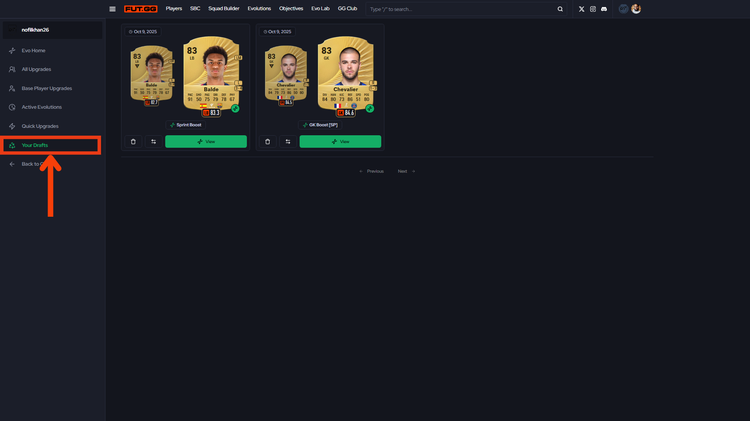
This section can be found in the Evolutions section of GG Club, then “Drafts”.
Have any more questions about GG Club? Let us know below!